

Table of Contents
Running out of iPhone storage? Large photo files eating up your space? You need a reliable photo compressor for iOS. With iPhone cameras capturing higher quality images, photo compression has become essential for managing storage and sharing images efficiently.
In this guide, we’ll explore the best photo compressor apps for iPhone and iPad in 2025, with PixFit leading the pack as the most comprehensive solution for all your image optimization needs.
Why You Need a Photo Compressor for iOS
Photo compression on iPhone offers several benefits:
- Free up storage space: A good photo compressor reduces file sizes from MB to KB
- Faster uploads: Compressed photos upload quicker to social media and cloud storage
- Easy sharing: Meet file size limits for email and messaging apps
- Better device performance: Less storage usage keeps your iPhone running smooth
PixFit: The Best Free Photo Compressor for iOS
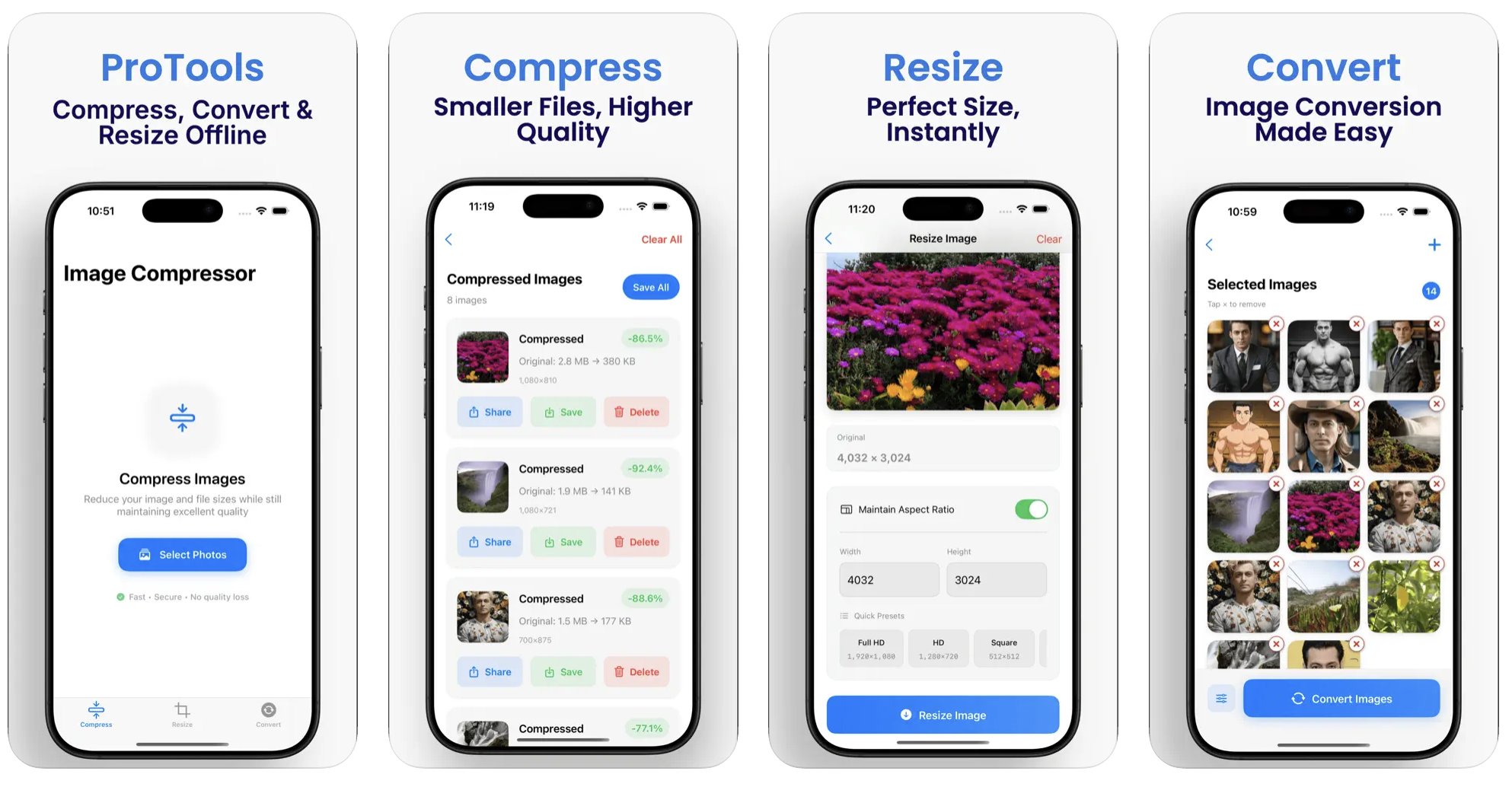
PixFit stands out as the ultimate photo compressor for iOS users. This completely free app combines powerful compression tools with an intuitive interface, making PixFit the go-to choice for photographers, bloggers, and everyday users.
Why PixFit is the Top Photo Compressor
PixFit delivers everything you need in a photo compressor:
- Image Compression: PixFit reduces file sizes significantly while preserving crystal-clear quality
- Resize Images: Scale photos to custom dimensions with PixFit’s advanced resizing tools
- Format Conversion: PixFit seamlessly converts between PNG, JPG, JPEG, HEIC, WEBP, GIF, TIFF
- Batch Processing: PixFit optimizes multiple images at once to save time
- File Size Reduction: Shrink large files from MB to KB using PixFit’s compression engine
- High-Quality Output: PixFit maintains image clarity even after compression
Top Photo Compressor Apps for iOS Comparison
| Photo Compressor App | Price | Batch Processing | Format Support | File Reduction | User Rating |
|---|---|---|---|---|---|
| PixFit | Free | ✓ | PNG, JPG, JPEG, HEIC, WEBP, GIF, TIFF | MB to KB | 5/5 |
| Photo Compress | Free/Premium | ✓ | Limited | Moderate | 4.5/5 |
| Image Size | Free | ✗ | Basic formats | Good | 4.3/5 |
| Squash | Paid | ✓ | Standard | Good | 4.6/5 |
| JPEG Mini | Trial/Paid | ✓ | JPEG only | Excellent | 4.4/5 |
How PixFit Photo Compressor Works
Using PixFit as your iOS photo compressor is simple:
- Download PixFit: Install this free photo compressor from the App Store
- Upload Images: Select photos from your device into PixFit
- Choose Settings: Pick compression level, resize dimensions, or format conversion
- Process Photos: Let PixFit optimize your images with its powerful compression
- Save Results: Download your compressed photos or share directly
PixFit Features That Make It the Best Photo Compressor
Advanced Compression Technology
PixFit uses cutting-edge algorithms to reduce file sizes without quality loss. This photo compressor can shrink images from several MB to just KB while maintaining visual clarity.
Multiple Format Support
PixFit supports all major image formats including PNG, JPG, JPEG, HEIC, WEBP, GIF, and TIFF. This makes PixFit versatile for any photo compression need.
Batch Processing Power
Need to compress multiple photos? PixFit handles bulk compression efficiently, making it the ideal photo compressor for users with large photo libraries.
Custom Resize Options
PixFit lets you resize images to specific dimensions, perfect for social media, websites, or professional requirements.
Who Should Use PixFit Photo Compressor?
PixFit serves various user types:
- Photographers: Use PixFit to compress high-resolution images for client delivery
- Bloggers: PixFit optimizes images for faster website loading
- Professionals: Prepare lightweight files with PixFit for emails and presentations
- Casual Users: PixFit helps save storage and share photos quickly
- Web Developers: Use PixFit to meet web design specifications
PixFit vs Other Photo Compressor Apps
Why PixFit Beats Competition
| Feature | PixFit | Other Photo Compressors |
|---|---|---|
| Price | Completely Free | Often paid or limited |
| Format Support | 7+ formats | Usually 2-3 formats |
| Batch Processing | Unlimited | Often restricted |
| Quality Preservation | Excellent | Varies |
| User Interface | Intuitive | Often complex |
| Processing Speed | Fast | Slower |
Real Results with PixFit Photo Compressor
See what PixFit can achieve:
| Original Size | After PixFit Compression | Space Saved | Quality |
|---|---|---|---|
| 8MB | 800KB | 90% | Excellent |
| 12MB | 1.2MB | 90% | Excellent |
| 15MB | 1MB | 93% | Very Good |
| 20MB | 2MB | 90% | Excellent |
How to Get Maximum Results from PixFit
Compression Tips with PixFit
- Use PixFit’s batch processing for multiple photos
- Experiment with different quality settings in PixFit
- Try PixFit’s format conversion for better compression ratios
- Use PixFit’s resize feature before compressing for maximum reduction
Best Practices for Photo Compression
- Always backup originals before using any photo compressor
- Test PixFit settings on sample photos first
- Use PixFit’s preview feature to check quality
- Choose appropriate compression levels based on intended use
PixFit for Different Use Cases
Social Media Optimization
PixFit helps prepare photos for Instagram, Facebook, and Twitter by compressing images to optimal sizes while maintaining quality.
Website Performance
Bloggers and web developers use PixFit to compress images for faster page loading, improving SEO and user experience.
Email Attachments
PixFit reduces photo sizes to meet email attachment limits without sacrificing image quality.
Storage Management
Free up iPhone storage by using PixFit to compress your entire photo library efficiently.
Alternative Photo Compressor Options
While PixFit is the best photo compressor for iOS, here are other options:
Built-in iOS Features
- iCloud Photo Library optimization
- HEIC format (smaller than JPEG)
- Photos app basic editing
Cloud Storage Solutions
- Google Photos compression
- Dropbox photo optimization
- OneDrive automatic compression
Common Photo Compression Mistakes
Avoid these errors when using any photo compressor:
- Over-compression: Don’t sacrifice quality for minimal size gains
- Wrong format choice: JPEG for photos, PNG for graphics
- Skipping backups: Always keep originals
- Ignoring intended use: Match compression to final purpose
The Future of Photo Compression Apps
Photo compressor technology continues evolving:
- AI-powered compression: Smarter algorithms like PixFit’s
- Real-time processing: Instant compression during capture
- Better quality preservation: Advanced compression without visible loss
- Integration features: Direct sharing and cloud uploads
Step-by-Step: Using PixFit Photo Compressor
Getting Started with PixFit
- Download PixFit from the App Store (completely free)
- Open PixFit and grant photo access permissions
- Tap “Select Photos” in PixFit interface
- Choose images from your photo library
- Pick compression settings in PixFit
- Tap “Process” and let PixFit work
- Save or share your optimized photos
Advanced PixFit Features
- Custom dimensions: Set specific width/height in PixFit
- Quality slider: Fine-tune compression level
- Format conversion: Change file type within PixFit
- Batch rename: Organize compressed files
Why PixFit is the Best Free Photo Compressor
PixFit combines professional-grade compression with user-friendly design. Unlike other photo compressor apps that charge for basic features, PixFit provides everything free:
- Unlimited compressions
- All format conversions
- Batch processing
- No watermarks
- No ads interrupting workflow
- Regular updates and improvements
Download PixFit Today
Ready to experience the best photo compressor for iOS? PixFit makes image compression effortless whether you’re a professional photographer or casual user. This powerful photo compressor delivers high-quality results while saving storage space and speeding up your workflow.
Get PixFit now and join thousands of users who trust this photo compressor to optimize their images. Transform your photo management with PixFit’s comprehensive compression tools.
Don’t let large photos slow down your device or uploads. Download PixFit photo compressor today and take control of your image optimization needs.
FAQs
What is the best free photo compressor for iOS?
PixFit is the best free photo compressor for iOS. Unlike other photo compressor apps, PixFit offers unlimited compressions, supports 7+ formats (PNG, JPG, JPEG, HEIC, WEBP, GIF, TIFF), and reduces files from MB to KB without quality loss – completely free.
Can I compress multiple photos at once with PixFit?
Absolutely! PixFit photo compressor offers powerful batch processing. You can select multiple photos and let PixFit compress them all simultaneously, saving time and effort compared to other photo compressor apps.
Will PixFit photo compressor reduce image quality?
PixFit uses advanced compression algorithms to minimize quality loss. While some reduction is inevitable with any photo compressor, PixFit maintains crystal-clear quality even after significant file size reduction from MB to KB.
Can I use PixFit to resize images for social media?
Yes! PixFit photo compressor includes custom resize options perfect for social media platforms. You can set specific dimensions for Instagram, Facebook, Twitter, or any platform while compressing files simultaneously.
Can I share compressed photos directly from PixFit?
Yes! PixFit photo compressor includes direct sharing options. After compression, you can share optimized photos to email, messaging apps, social media, or cloud storage directly from PixFit interface.